
Plan a better process
Describe your intake, approval or signature process. Ask Concierge to explain the sequence and help identify the decisions along the way.
MEET CONCIERGE
Your guide to getting things done in Intaria. Ask a question, shape a form or work through a problem in plain language.

WHAT YOU CAN DO
From your first form to a question about an existing process, start with what you want to accomplish.
Describe your intake, approval or signature process. Ask Concierge to explain the sequence and help identify the decisions along the way.
When signed in, ask Concierge to create a form. Open the draft, review the questions and make it fit your work.
Ask to add a question, rename a field or change which answers are required. Review the saved changes in the builder.
Ask about templates, signatures, plans or integration options. Follow the relevant Intaria guidance for your next step.
Describe the expected result, what happened and the form or step involved. Ask what to check next.
When signed in, ask Concierge to find a previous form or help clone it into a new draft. Review the copy before using it.
SEE HOW IT WORKS
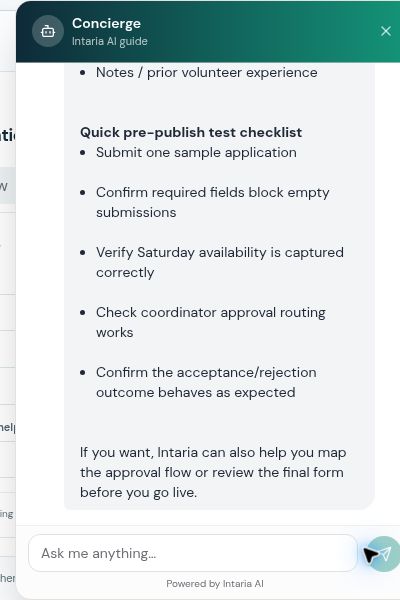
Follow a real Concierge conversation about volunteer intake, then see how a follow-up question turns broad guidance into a practical checklist.
GET STARTED
Select the Concierge button in the lower-right corner of Intaria, or use an Open Concierge button on this page.
Tell it what you are trying to do, who is involved and what information or decision matters. Ask a follow-up to make the answer more specific.
Check the answer. If a draft or edit was created, open it and inspect the result. Test your process before choosing to publish.
A REAL EXAMPLE
This conversation was captured on the Intaria website. It demonstrates planning and review; it does not create or publish a form.
01 / DESCRIBE THE PROCESS
Help me plan a volunteer application for a community food bank. I need contact details, Saturday availability, and coordinator approval before acceptance. Explain the form and workflow; do not create or publish anything.
02 / REFINE THE ANSWER
Which fields should be required, and what should I test before publishing? Keep the checklist brief.
TRY YOUR OWN QUESTION
Copy a request, open Concierge and adapt the details to your organization.
Help me plan a volunteer application with contact details, availability and coordinator approval. Explain the steps before I build it.
Create a draft event registration form with name, email and attendance preference. I want to review it before publishing.
Sign in to create and save a draft.On this form, make the email question required and add an optional question for accessibility requirements.
Open the relevant form while signed in.I expected [result], but [what happened]. This concerns [form or step]. What should I check first?
YOU STAY IN CONTROL
Visitors can ask questions and plan a process. Sign in when you want to create or save work.
Drafts and edits follow workspace permissions. Open the result and confirm it matches your request.
Review and test first. Publishing requires your confirmation.
A FEW GOOD QUESTIONS
You can ask product questions and discuss a process as a visitor. You need to sign in to create, edit or save forms in your workspace.
When you are signed in and have the appropriate workspace permissions, Concierge can create drafts and make supported edits. Always open the resulting form and check the changes.
Publishing requires your explicit confirmation. Review the form and test the workflow before making it live.
Describe the outcome you want, the relevant form or step, and what you have already tried. For an error, include the visible reference. Leave out passwords, access tokens and unnecessary customer information.
Yes. You can ask questions in Spanish. The Spanish version of this page also includes the written walkthrough.
Use Intaria Support or contact the team when you need help beyond the answer provided. Share the relevant context and what you have already checked.
YOUR NEXT STEP STARTS HERE
Start with one question. Give it context. Make the next step clearer.